Why Kajabi Analytics Outperform Competitors in 2026

Kajabi analytics outperform competitors by delivering a fully integrated performance intelligence system that combines revenue, email marketing, and student engagement data inside one native dashboard. While platforms like Thinkific and Teachable require you to stitch together Stripe, Mailchimp, and Google Analytics just to get a basic picture of your business, Kajabi gives you that picture out of the box. The result is faster decisions, fewer technical headaches, and a clearer view of what is actually driving your revenue. For course creators and coaches who want to grow without drowning in spreadsheets, that difference is not minor. It is the whole game.
Why Kajabi analytics outperform competitors for course creators
Kajabi's analytics advantage starts with what it tracks natively, without any third-party setup. The Kajabi dashboard tracks net revenue, monthly recurring revenue, new customers, active members, email open rates, click rates, and student course progress, all in one connected view. Email attribution links specific campaigns to revenue within a 30-day window, so you know exactly which email sequence converted a subscriber into a paying student. That level of attribution is something most standalone course platforms simply do not offer.
Here is what Kajabi tracks that competitors typically miss or lock behind add-ons:
- Net revenue and MRR updated in real time, not delayed by third-party payment syncs
- Average revenue per user (ARPU) and lifetime value (LTV): useful measures for understanding what each customer contributes to your business and planning your acquisition budget.
- Churn rate for subscription-based products, critical for membership site owners
- Student course progress by lesson, module, and completion percentage
- Email performance tied directly to revenue, not just open rates in a separate tool
- Viewer Heatmap video analytics, which track engagement by 10–30 second segments to pinpoint exactly where students skip or rewatch content
That last feature deserves its own spotlight. The Viewer Heatmap highlights specific lesson segments where engagement drops or spikes, giving you a precise map of your content's strengths and weaknesses. No other major course platform offers this natively.
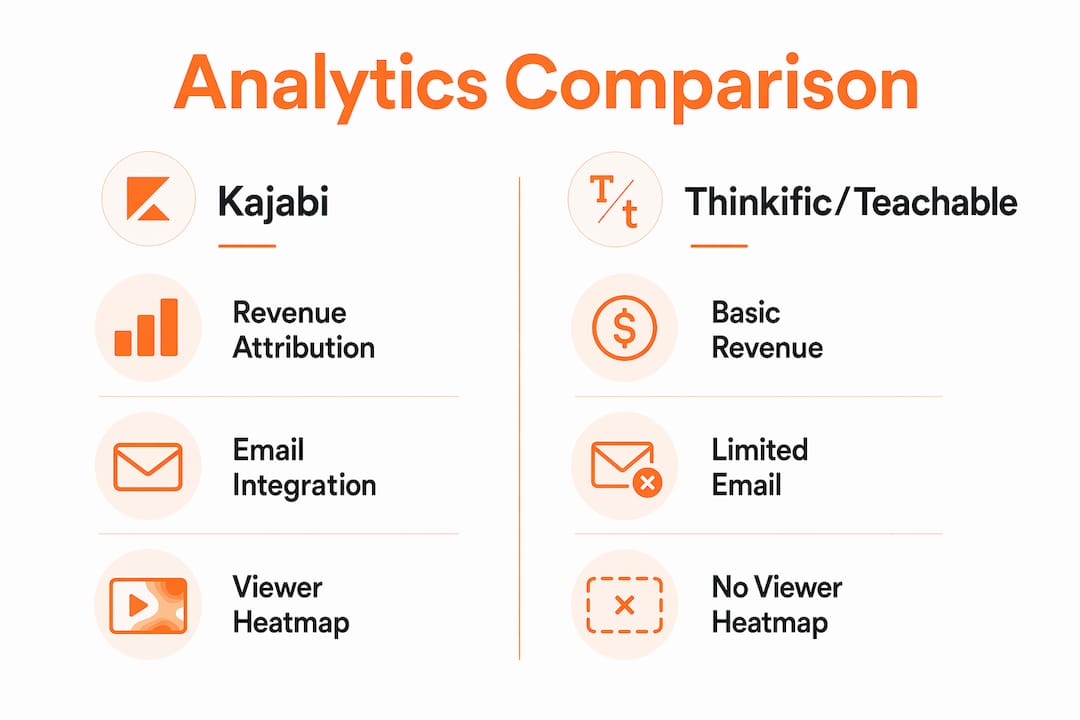
| Feature | Kajabi | Thinkific / Teachable |
|---|---|---|
| Revenue attribution to email | Native, 30-day window | Requires third-party integration |
| Video engagement heatmaps | Built-in Viewer Heatmap | Not available natively |
| Churn and LTV tracking | Native dashboard | Limited or add-on required |
| Student progress tracking | Full lesson-level data | Basic completion rates |
| Unified marketing + course data | Single dashboard | Separate tools required |

Pro Tip: Check your Viewer Heatmap data after every new course launch. Segments with repeated rewatches often signal confusion, not enthusiasm. That is your cue to re-record or add a clarifying resource.
How Kajabi eliminates the data fragmentation problem
Data fragmentation is the silent killer of most course creator businesses. When your payment processor lives in Stripe, your email lives in ConvertKit, and your course platform is Teachable, you are constantly reconciling three different data sources that were never designed to talk to each other. External integrations often break or require complex setup, and every time one fails, you lose visibility into your business at exactly the moment you need it most.
Kajabi solves this with a native data architecture that was built as one system from the ground up. Here is what that means in practice:
- A student watches 80% of a video lesson. Kajabi logs that behavior instantly.
- That behavior triggers an automated email offering a related upsell or a check-in message, with no Zapier workflow required.
- The email generates a purchase. Kajabi attributes that revenue directly to the email campaign in your dashboard.
- You see the full customer lifecycle, from website visit to course engagement to revenue, in one connected view.
This is not a small convenience. Native integration provides data accuracy and reliable automation from day one, while competitors' patched-together systems introduce lag, errors, and gaps. When you are making decisions about ad spend, content updates, or pricing, you need data you can trust. Kajabi's unified architecture delivers that.
"Kajabi's true analytic power lies in its connected ecosystem, telling a complete customer lifecycle story rather than fragmented reports." — Kajabi Blog
The business impact compounds over time. As your course catalog grows and your email list scales, having all behavioral data feed automatically into your marketing workflows means your business scales without requiring a bigger tech stack or a dedicated operations hire.
Kajabi vs. Thinkific and Teachable: a direct analytics comparison
The honest comparison between Kajabi, Thinkific, and Teachable comes down to one question: are you running a knowledge business or just hosting courses? Kajabi is built for the former. Its analytics align with subscription business models, surfacing churn, ARPU, and LTV as primary metrics rather than burying them. Thinkific and Teachable treat course completion and enrollment counts as the headline numbers, which tells you very little about revenue health.
Cost is also worth examining honestly. Kajabi's pricing runs from $179 per month to $499 per month, which looks expensive at first glance. But consolidating revenue, marketing, and student data into one platform saves $200–$500 monthly compared to maintaining separate tools for email marketing, payment processing, course hosting, and analytics. The math often favors Kajabi once you account for what you are replacing.
Thinkific's analytics are clean and easy to read, but they stop at course completion and enrollment data. To get email attribution or revenue forecasting, you need to connect Mailchimp or ActiveCampaign and build custom reports manually. Teachable offers slightly more financial reporting, but its email analytics are still siloed from course behavior data. Neither platform offers anything close to Kajabi's Viewer Heatmap or its native 30-day email revenue attribution window.
Pro Tip: If you are evaluating platforms, ask one question before signing up: "Can I see which specific email campaign generated this sale, without leaving the platform?" If the answer requires a third-party tool, you are accepting a data gap that will cost you clarity later.
Kajabi does have limits worth naming. It lacks enterprise-grade cross-funnel revenue attribution and funnel velocity metrics that larger operations need. Most creators scale comfortably with Kajabi through the seven-figure range before needing to layer on more advanced software. For the vast majority of course creators and coaches, Kajabi's analytics are more than enough to run a sharp, data-informed business.
How course creators use Kajabi analytics to improve performance
The real test of any analytics tool is what you actually do with the data. Kajabi's integrated dashboard makes it easy to move from insight to action without switching tabs or exporting CSVs. Here are the highest-value ways creators use it:
- Refine email campaigns with revenue attribution. When you can see that one specific email sequence generated $4,200 in a single week, you know exactly what to repeat and what to cut. One creator grew from $5,000 to nearly $50,000 in yearly revenue after switching to Kajabi, crediting smarter ad spend decisions driven by dashboard insights.
- Optimize course content with Viewer Heatmap data. Video engagement heatmaps diagnose both disengagement points and confusing content spots, so you update materials based on evidence rather than guesswork.
- Track student behavior to improve product design. If 60% of students drop off at lesson three of a five-lesson module, that is a product problem, not a marketing problem. Kajabi surfaces this data clearly so you can fix the right thing.
- Reduce technical overhead to focus on growth. When your analytics run without manual exports or integration maintenance, you reclaim hours every week that go back into content creation and client work.
For business owners who want to see how Kajabi's analytics support the full client journey, the best Kajabi features guide covers this in detail.
Key Takeaways
Kajabi analytics outperform competitors because they deliver a unified, native data ecosystem that connects revenue, email, and student behavior in one dashboard, eliminating the fragmentation that limits Thinkific and Teachable users.
| Point | Details |
|---|---|
| Integrated dashboard advantage | Kajabi tracks revenue, email attribution, and student progress natively without third-party tools. |
| Viewer Heatmap is unique | No major competitor offers native video engagement heatmaps at the 10–30 second segment level. |
| Data fragmentation costs you | Broken integrations between separate tools create data gaps that lead to poor business decisions. |
| Analytics align with revenue models | Kajabi surfaces churn, ARPU, and LTV as primary metrics, unlike competitors that prioritize enrollment counts. |
| Practical ROI is measurable | Creators save $200–$500 monthly by replacing fragmented tools with Kajabi's all-in-one platform. |
What I have learned after years inside the Kajabi ecosystem
I have worked with coaches and course creators across dozens of Kajabi builds, and the pattern I see most often is this: people underestimate how much bad data costs them. Not missing data. Bad data. The kind that comes from syncing Stripe with Teachable through a Zapier workflow that broke three weeks ago and nobody noticed.
When I moved clients from fragmented setups onto Kajabi, the first thing they always say is, "I had no idea my best-performing email was that one." They had been optimizing the wrong campaigns for months because their data was siloed. Kajabi does not just give you more metrics. It gives you metrics you can actually act on, because they are all talking to each other.
My honest advice: do not wait until you are at six figures to care about analytics. The habits you build at $2,000 per month are the same ones that carry you to $20,000 per month. Kajabi's dashboard is built for that entire arc. And if you are already on Kajabi but not using the Viewer Heatmap or email attribution features, you are leaving real money on the table. Those two features alone have changed how I advise clients on content and campaign strategy.
One caveat I always share: Kajabi is not the right fit if you need enterprise attribution modeling or cross-funnel velocity reporting. But for 95% of the business owners I work with, it is exactly the right level of insight at exactly the right time.
Ready to get more from your Kajabi platform?
Understanding your analytics is one piece of the puzzle. The other piece is having a Kajabi site that is set up to convert the traffic your data reveals. At Sierra Lin Design, I build custom Kajabi websites for business owners who want their platform working as hard as they do. Whether you are starting fresh or ready to upgrade a site that has outgrown its original design, I can help you build something that looks great and runs like clockwork. Grab the free Kajabi templates to get started quickly, or explore custom Kajabi web design.
FAQ
What is the Kajabi analytics dashboard?
The Kajabi analytics dashboard is a native reporting interface that tracks revenue, email performance, student course progress, and marketing metrics in one connected view. It eliminates the need for separate analytics tools by consolidating all business data in a single platform.
Does Kajabi track video engagement natively?
Yes. Kajabi's Viewer Heatmap tracks student engagement at the 10–30 second segment level, identifying exactly where students skip, drop off, or rewatch content. This feature is not available natively on Thinkific or Teachable.
How does Kajabi attribute revenue to email campaigns?
Kajabi links email campaigns to purchases within a 30-day attribution window, showing you which specific emails generated revenue without requiring a third-party integration or manual reporting.
Is Kajabi analytics suitable for large-scale businesses?
Kajabi analytics serve most creators well through the seven-figure revenue range. For enterprise-grade cross-funnel attribution or funnel velocity metrics, more advanced software may be needed, but most course creators and coaches will not hit that ceiling.
How does Kajabi compare to Thinkific for analytics?
Kajabi tracks churn, ARPU, LTV, and email revenue attribution natively, while Thinkific focuses primarily on enrollment and completion data. Getting comparable financial and marketing insights from Thinkific requires connecting multiple external tools.
Recommended
 Sierra Janisse · Kajabi Designer, Kajabi Expert, & Kajabi Website Designer
Sierra Janisse is a verified Kajabi Expert who helps online business owners build profitable websites on Kajabi. From SEO and copywriting to website design, branding, automations and funnel strategy, she is the go-to expert for Kajabi users who want to attract more clients and customers with their websites.

🚨Get the FREE Checklist
Skip the Kajabi tears—Swipe the free Website Checklist & Funnel Map
Exactly what should go where on your Kajabi site to maximize leads.