Coaching Site Discovery Call Booking Setup Guide

A well-configured coaching site discovery call booking setup converts more prospects into paying clients by removing friction and qualifying leads before the call even starts. This is the industry term coaches use for the full system: scheduling tools, intake forms, automated reminders, and booking page copy working together. Coaches who screen prospects with intake forms see a 94% call qualification rate and nearly double their client close rate. That number tells you one thing clearly: the setup itself is a sales tool, not just a calendar. Get it right, and your discovery call scheduling runs like clockwork.
What tools and prerequisites do you need for discovery call scheduling?
Every effective coaching session booking system starts with the same core components. Before you configure anything, confirm you have these in place.
- Calendar integration. Your booking tool must sync with Google Calendar or Apple Calendar in real time. Double bookings kill credibility fast.
- Automated confirmation and reminder emails. Automated reminders reduce no-shows by up to 85%. That is not a minor improvement. It is the difference between a full week and a half-empty one.
- Intake form capability. Your tool must let you gate booking access behind a short form. No form means no pre-qualification.
- Timezone detection. Scheduling systems that automatically detect client timezones eliminate booking confusion and reduce no-shows for coaches working across regions.
- Buffer time settings. You need the ability to block 10–15 minutes between calls automatically.
The table below shows how each component maps to a specific outcome in your booking flow.
| Component | Purpose |
|---|---|
| Calendar sync | Prevents double bookings and shows real availability |
| Automated reminders | Reduces no-shows by up to 85% |
| Intake form gating | Pre-qualifies leads before they reach your calendar |
| Timezone detection | Removes scheduling confusion for global clients |
| Buffer time settings | Protects call quality and your mental focus |
Pro Tip: Start with one session type and one booking page. Coaches who launch with too many options create confusion before the call even happens.
Kajabi includes native scheduling features that handle most of these requirements without needing third-party tools. That matters because every extra integration is another thing that can break.
How do you create a booking page that actually converts?
Booking pages with warm, no-pressure language convert 2–3 times better than generic scheduling pages. Most coaches write something like "Book a 30-minute call." That tells the prospect nothing about what they will get or why it is worth their time.
Your booking page needs four things working together.
- A clear headline. State who the call is for and what they will walk away with. Example: "Book your free 30-minute strategy call for coaches ready to sign their next three clients."
- A brief description. Two to three sentences explaining the call's purpose, what you will cover, and that there is no obligation. Warm language builds trust before you ever speak.
- The call length and format upfront. Prospects want to know exactly how much time they are committing. Ambiguity creates hesitation.
- A prominent booking widget. Place it above the fold. Do not make prospects scroll to find the calendar.
Pre-call intake questions serve two purposes. They filter out prospects who are not ready, and they prepare you to have a genuinely useful conversation. Ask about goals, current challenges, budget range, and timeline. Keep it to four or five questions maximum. Longer forms cause drop-offs.
Pro Tip: Frame your intake form as "helping us prepare for your call" rather than screening. Prospects complete forms faster when they feel the questions benefit them.

Avoid the common trap of writing your booking page for everyone. The best coaching lead generation pages speak directly to one type of client. Specificity signals expertise, and expertise builds the confidence a prospect needs to book.
For a deeper look at what kills conversions before a prospect even reaches your booking page, the coaching website conversion mistakes guide covers the most common structural problems coaches overlook.
What is the step-by-step process to set up your automated booking system?
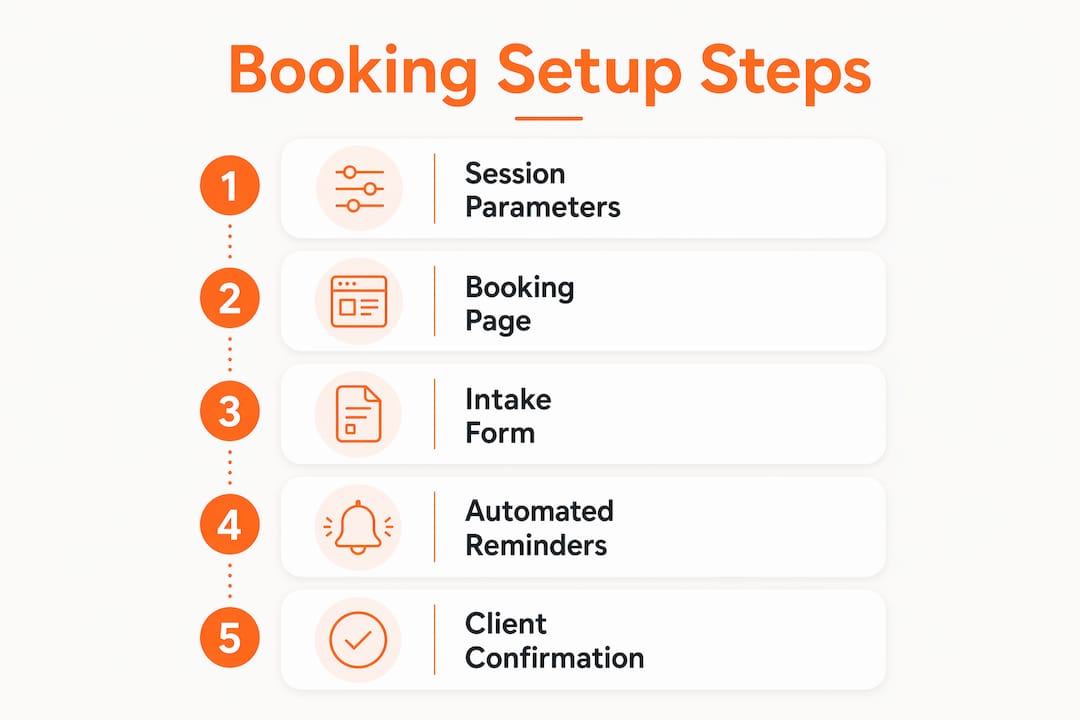
A complete automated booking setup has six steps. Follow them in order and you will have a working system in a single afternoon.
-
Set your session parameters. Define the call duration (30 minutes is standard for discovery calls), set the price to free or paid, and configure a 10–15 minute buffer after each session. A 10–15 minute buffer prevents exhaustion and protects call quality.
-
Configure your availability windows. Choose specific days and time blocks you will accept calls. Avoid opening your entire week. Scarcity signals demand and protects your schedule.
-
Build and gate your intake form. Create a short form with four to five questions covering goals, timeline, budget, and current situation. Gate the booking page so prospects must complete the form before selecting a time slot.
-
Set up automated email sequences. Configure three emails: an immediate booking confirmation, a reminder 24 hours before the call, and a reminder one hour before. Include a pre-call resource or short video in the confirmation email to warm up the prospect. Integrated automated emails help convert 40–50% of discovery calls into paid programs post-call.
-
Embed or link your booking page on your website. Place the link in your navigation, your homepage hero section, and any relevant blog posts or lead magnet thank-you pages.
-
Sync with your calendar and payment system. Confirm the two-way calendar sync is active. If you charge for discovery calls, connect your payment processor before going live.
| Step | Action | Outcome |
|---|---|---|
| Session parameters | Set duration, price, buffer | Consistent call structure |
| Availability windows | Limit to specific days | Protects schedule and signals demand |
| Intake form gating | Require form before booking | Pre-qualifies every lead |
| Automated emails | Confirmation plus two reminders | Reduces no-shows, warms prospects |
| Website embedding | Add to nav, hero, and blog | Increases booking visibility |
| Calendar and payment sync | Two-way sync, payment connected | Prevents conflicts, enables paid calls |
Pro Tip: Test your entire booking flow as a prospect before going live. Book a fake appointment, complete the intake form, and check that all three automated emails arrive correctly.
For coaches using Kajabi, the best Kajabi features for client acquisition covers how to connect your booking system directly to your pipeline automation.
What mistakes should coaches avoid with their booking setup?
The most damaging mistake is offering too many session length options. Choice overload reduces booking conversions by up to 20%. Prospects who see three or four call types freeze and leave. Offer one discovery call option until your volume justifies more.
- Missing buffer time. Many coaches skip the buffer between calls entirely. That leaves no time for notes, mental reset, or handling a call that runs long. Call quality drops by the third session of the day.
- Weak booking page copy. A page that says only "Schedule a call" gives prospects no reason to commit. Vague descriptions signal that the coach has not thought through the client experience.
- No automated reminders. Sending a single confirmation email and nothing else is the fastest way to fill your calendar with no-shows. Two reminders, at 24 hours and one hour out, are the minimum.
- Intake forms that are too long. More than six questions causes drop-offs. The goal is qualification, not interrogation. Ask only what you genuinely need to prepare for the call.
Scheduling is a sales process, so follow-up communication and pre-call preparation are critical for quality conversations. Coaches who treat the booking page as the end of the process miss the real opportunity. The emails, the intake form, and the pre-call resource you send are all part of building the prospect's confidence before you say hello.
Pro Tip: Review your intake form responses before each call. Coaches who arrive prepared convert at a significantly higher rate than those who treat every call as a cold conversation.
Good appointment setting practices apply directly to coaching discovery calls. The same principles that drive B2B sales meetings, clear value framing, pre-call qualification, and timely follow-up, work just as well for coaches.
Coaches who convert approximately 40% of free discovery call bookers into paid clients do so because their system qualifies leads before the call, not during it. That is the real payoff of a well-built setup.
Key Takeaways
A properly configured discovery call booking system qualifies leads upfront, reduces no-shows with automation, and converts a higher percentage of prospects into paying clients.
| Point | Details |
|---|---|
| Gate booking with intake forms | Pre-qualifying leads produces a 94% call qualification rate and nearly doubles close rates. |
| Use automated reminders | Two reminders at 24 hours and one hour before the call reduce no-shows by up to 85%. |
| Write warm booking page copy | No-pressure language converts 2–3 times better than generic scheduling pages. |
| Set buffer time between calls | A 10–15 minute buffer protects call quality and prevents coach fatigue. |
| Offer one session type | Limiting choices removes decision paralysis and keeps booking conversions high. |
What I've learned about booking systems that most guides skip
Most articles on discovery call setup focus entirely on the technical configuration. Pick a tool, embed the widget, done. That misses the bigger picture entirely.
Your booking page is the first real sales conversation you have with a prospect. They are reading your description and deciding whether you understand their problem. If your copy sounds like a generic calendar link, they assume your coaching will feel the same way.
I have seen coaches with technically perfect setups, correct buffer times, working reminders, synced calendars, who still get low-quality bookings. The intake form asked the wrong questions. The booking description was too vague. The prospect arrived on the call with no idea what to expect.
The fix is simple but requires honesty. Read your booking page as if you are your ideal client. Does it speak directly to their specific situation? Does it make the call feel worth 30 minutes of their time? If the answer is no, the tech setup does not matter.
Fewer but higher-quality discovery call bookings lead to better conversion and less wasted time than chasing volume. I believe that completely. A coach who books eight qualified calls a week will outperform one who books twenty unqualified ones every single time.
Build your system for the right person, not the most people. That shift in thinking changes everything about how you write your booking page, design your intake form, and follow up after the call.
How Sierra Lin Design helps coaches build booking systems that work
If you have been putting off your booking setup because the tech feels like too much, you are not alone. Most coaches I work with had the same hesitation before we built their Kajabi site together. At Sierra Lin Design, the free Kajabi templates include pre-built page layouts designed specifically for coaches, with form placement, warm copy structure, and call-to-action positioning already built in.
For coaches who want a fully custom setup, the Kajabi Coach Accelerator builds your entire client attraction workflow, including your discovery call booking system, from the ground up. You focus on coaching. The system handles the rest.
FAQ
What is a discovery call booking setup for coaches?
A discovery call booking setup is the full system a coach uses to let prospects schedule, qualify for, and prepare for an introductory call. It includes a booking page, intake form, scheduling tool, and automated email sequence.
How do intake forms improve discovery call quality?
Intake forms pre-screen prospects before they reach your calendar. Coaches using intake forms to pre-qualify leads see a 94% call qualification rate and nearly double their client conversion rate.
How many reminder emails should I send before a discovery call?
Send two automated reminders: one at 24 hours before the call and one at one hour before. Automated reminders reduce no-shows by up to 85%.
Should I charge for discovery calls?
Most coaches offer discovery calls for free to lower the barrier to entry. Coaches who convert approximately 40% of free discovery call bookers into paid clients generate strong revenue without charging for the initial call.
How long should a coaching discovery call be?
Thirty minutes is the standard length for a coaching discovery call. It gives you enough time to understand the prospect's situation and present your offer without requiring a large time commitment from either party.
Recommended
 Sierra Janisse · Founder of Sierra Lin Design
Sierra Janisse is a verified Kajabi Expert who helps online business owners build profitable websites on Kajabi. From SEO and copywriting to website design, branding, automations and funnel strategy, she is the go-to expert for Kajabi users who want to attract more clients and customers with their websites.

🚨Get the FREE Checklist
Skip the Kajabi tears—Swipe the free Website Checklist & Funnel Map
Exactly what should go where on your Kajabi site to maximize leads.