Kajabi Webinar Hosting Explained for Course Creators

Kajabi webinar hosting is a unified system that combines pre-built marketing funnels, native video hosting, and live streaming integrations into one platform. For online entrepreneurs and course creators, this means you can run a complete webinar funnel without stitching together five different tools. Kajabi Pipelines connect your registration page, email sequences, and checkout into a single workflow. Add in unlimited video hosting powered by Wistia and no-code integrations with Zoom or YouTube Live, and you have a webinar system that runs like clockwork from the moment someone signs up to the moment they buy.
What is Kajabi webinar hosting and how does it work?
Kajabi webinar hosting is built around three core components: Pipelines for funnel management, Wistia-powered video hosting for pre-recorded content, and embedded live streaming through Zoom or YouTube Live. Each piece connects natively inside Kajabi, so you never need an external API or a Zapier workflow to make them talk to each other. That single-platform approach is what separates Kajabi from a patchwork setup.
Kajabi Pipelines are pre-configured marketing funnels that link landing pages, email automation, and checkout into one workflow. Every registration, page visit, and purchase is tracked in Kajabi's unified contacts database. That means your data stays clean and your follow-up sequences fire correctly every time.

For video, Kajabi includes unlimited bandwidth and unlimited video hosting powered by Wistia in every pricing plan. A standalone Wistia subscription typically costs $99 per month. Getting it included inside Kajabi is a real cost advantage for creators who host multiple trainings and replays.
For live events, Kajabi does not have built-in live streaming software. Instead, it offers native integrations with Zoom and YouTube Live, embedding those sessions directly inside your Kajabi pages so attendees never leave your branded environment.
What are Kajabi Pipelines and how do they support webinar hosting?
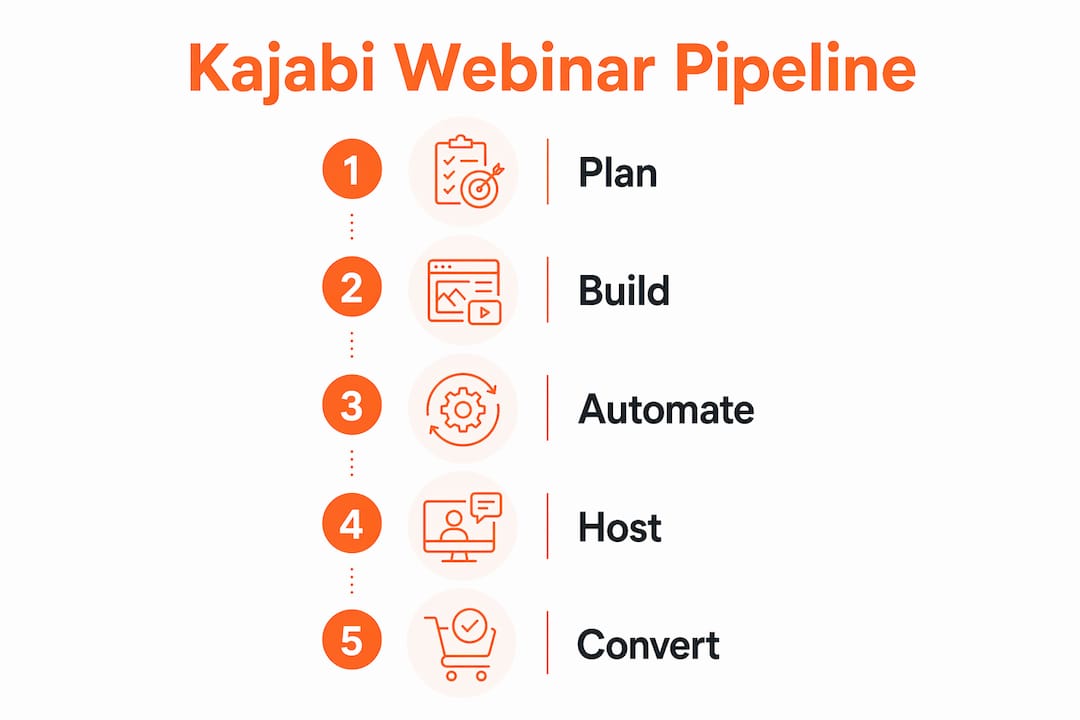
Kajabi Pipelines are the backbone of any webinar funnel on the platform. They are pre-built, customizable workflows that connect every step a prospect takes, from clicking your registration link to completing a purchase after your presentation.
Here is what a standard webinar Pipeline includes:
- Registration page where leads enter their name and email
- Confirmation page with event details and calendar links
- Automated email sequence covering pre-webinar reminders and day-of logistics
- Live event or replay page where the session is embedded
- Post-webinar offer page with a checkout connected to Stripe or PayPal
- Follow-up email sequence with replay access and a time-sensitive offer
The biggest advantage of using Pipeline templates is speed. Many creators waste hours building pages from scratch when a pre-built template already has the correct page flow, tracking, and automation wired in. You customize the copy and branding, and the structure is already done.
Pipelines also eliminate the need for external tools. Because every step lives inside Kajabi, registration to purchase is tracked natively in one contacts database. You see exactly where someone dropped off, which email they opened, and whether they watched the replay.
Pro Tip: Start with a Kajabi Pipeline template for your first webinar funnel. Customize the copy and design, but keep the existing page flow and automation logic intact. This saves hours and prevents the most common setup mistakes.
How to manage live and pre-recorded webinar content on Kajabi
Kajabi handles live and pre-recorded webinar content differently, and knowing the distinction saves you a lot of frustration.
For pre-recorded content, Kajabi's Wistia-powered player gives you a branded, ad-free viewing experience with unlimited bandwidth. Your replay videos load fast, look professional, and never serve a competitor's ad before your content plays. That matters when you are asking someone to watch a 60-minute training.
For live events, the setup works through embedding. You run your live session on Zoom or YouTube Live, then embed that stream directly on a Kajabi page. Attendees register through your Kajabi funnel, receive automated reminders, and click through to a Kajabi-hosted page to watch. They stay inside your ecosystem the entire time.
One mistake trips up almost every beginner: uploading YouTube or Vimeo URLs directly into Kajabi's video player does not work. Kajabi requires raw video file uploads, such as MP4 files, for its Wistia-powered player to function correctly. Paste a YouTube link where a video upload belongs and you will get a broken player on your replay page.
The practical takeaway is simple. Upload your raw video files directly to Kajabi for all pre-recorded content. Use Zoom or YouTube Live embeds for live sessions. Keep both inside your Kajabi pages for a consistent, branded experience.
What integrations and automation features enhance Kajabi webinar hosting?
Kajabi's automation features are what turn a single webinar into a repeatable sales system. The platform handles the communication timeline for you, so you are not manually sending reminder emails the morning of your event.
A well-built Kajabi webinar funnel uses this automation sequence:
- Immediate confirmation email sent the moment someone registers, with event details and a calendar link
- 24-hour reminder with a short re-engagement message and a preview of what they will learn
- 1-hour reminder with a direct link to the event page
- 15-minute reminder sent as a final nudge before the session starts
- Post-webinar follow-up with the replay link and a time-sensitive offer
- Second follow-up 24–48 hours later for people who did not purchase, with a deadline reminder
Map out the webinar follow-up sequence before setting up your automations. Check each trigger, message, and destination, then test the full journey so attendees receive the right information at the right stage.
For checkout, native integrations with Stripe and PayPal let attendees complete a purchase without leaving your Kajabi funnel. Payments happen inside the ecosystem, which reduces drop-off at the most critical moment.
Pro Tip: Keep your external integrations minimal. Every additional integration adds a potential point of failure during a live event. Use Kajabi's native tools first, and only add outside tools when the platform genuinely cannot do what you need.
What are common pitfalls and expert tips for Kajabi webinars?
The most common mistake course creators make is ignoring Pipeline templates and building their webinar funnel from scratch. This approach takes longer, introduces more room for error, and often results in broken automations because the page connections were not set up correctly.
Here are the pitfalls worth avoiding:
- Skipping Pipeline templates. Pre-built templates have correct tracking and automation logic already configured. Starting from scratch risks missing a critical connection.
- Over-relying on third-party tools. Every external tool you add is another thing that can break during a live event. Kajabi's native features cover the full funnel for most creators.
- Treating the webinar as a one-time event. The real value comes from the automated follow-up sequence. A well-timed replay email and a deadline-driven offer often convert more attendees than the live session itself.
- Using YouTube or Vimeo URLs instead of raw uploads. This breaks the Wistia player and creates a poor experience for replay viewers.
- Skipping pre-event testing. A broken registration form or a misfiring email sequence on launch day costs you real revenue.
Kajabi's tagging and segmentation tools add another layer of personalization. You can tag attendees who watched the replay but did not purchase, then send them a different follow-up sequence than live attendees. That kind of automated segmentation lets you speak directly to where someone is in the decision process.
Pro Tip: Run a full test of your webinar funnel at least 48 hours before your live event. Register as a test contact, go through every email, click every link, and complete a test purchase. Fix issues before your audience sees them.
Key Takeaways
Kajabi webinar hosting works best when you use Pipelines, native video hosting, and automated email sequences together as one connected system rather than isolated features.
| Point | Details |
|---|---|
| Use Pipeline templates | Pre-built templates save time and keep tracking and automation correctly wired from the start. |
| Upload raw video files | Kajabi's Wistia player requires MP4 uploads, not YouTube or Vimeo URLs, for replay pages to work. |
| Automate the full sequence | Set up reminders at 24h, 1h, and 15min before the event, plus post-webinar follow-ups with replay and offer links. |
| Minimize external integrations | Native Kajabi tools cover the full webinar funnel for most creators and reduce live-event failure risk. |
| Test before you go live | A full funnel test 48 hours before your event catches broken links, emails, and checkout issues in time to fix them. |
What I have learned from watching business owners use Kajabi webinars
Working with coaches and course creators on their Kajabi builds, I have seen the same pattern repeat itself. The creators who get the best results from their webinars are not the ones with the fanciest design. They are the ones who trust the system and let the automation do its job.
The biggest shift I see is when a business owner stops thinking of a webinar as a live event and starts treating it as a funnel. The live session is just one touchpoint. The confirmation email, the reminders, the replay, the follow-up offer, the deadline email — that is where the conversion actually happens. Kajabi is built for exactly that kind of multi-stage thinking, and the Kajabi ecosystem benefits for users who commit to it are real.
What I also notice is how much time gets wasted when creators try to build everything from scratch or bolt on outside tools they do not need. Kajabi's Pipeline templates exist for a reason. They are not a shortcut for lazy creators. They are the result of what actually works, packaged into a starting point you can customize. The creators who use them launch faster and convert better.
My honest advice: resist the urge to complicate it. Use the native tools, follow the funnel logic, and test everything before you go live. Kajabi gives you a complete webinar system. Your job is to use it well.
How Sierra Lin Design can help with your Kajabi webinar funnels
If you are ready to build a funnel that looks as good as it converts, Sierra Lin Design works with Kajabi users to design custom Kajabi pages and set up automation that actually performs. You can grab free Kajabi templates to jump-start your webinar funnel right now, or work with Sierra directly through custom Kajabi web design services. We handle the tech so you can focus on showing up and selling.
FAQ
What is Kajabi webinar hosting?
Kajabi webinar hosting is a system that combines Pipelines, Wistia-powered video hosting, and Zoom or YouTube Live integrations to run complete webinar funnels inside one platform. It covers registration, email automation, live or pre-recorded content delivery, and checkout without external tools.
Does Kajabi have built-in live streaming?
Kajabi does not have native live streaming software. It integrates with Zoom and YouTube Live, embedding those sessions directly on Kajabi pages so attendees stay inside your branded funnel.
How do I host a pre-recorded webinar on Kajabi?
Upload your raw video file, such as an MP4, directly to Kajabi so it plays through the Wistia-powered player. Do not paste a YouTube or Vimeo URL into the video field, as that will break the player on your page.
What is a Kajabi Pipeline?
A Kajabi Pipeline is a pre-built marketing funnel that connects your registration page, email sequences, and checkout into one automated workflow. Pipeline templates come pre-configured for webinars, saving setup time and reducing errors.
How do I automate webinar reminders in Kajabi?
Kajabi workflows let you set automated email reminders at 24 hours, 1 hour, and 15 minutes before your event, plus post-webinar follow-ups with replay links and offer deadlines. The entire sequence runs automatically once a contact registers.
Recommended
 Sierra Janisse · Founder of Sierra Lin Design
Sierra Janisse is a verified Kajabi Expert who helps online business owners build profitable websites on Kajabi. From SEO and copywriting to website design, branding, automations and funnel strategy, she is the go-to expert for Kajabi users who want to attract more clients and customers with their websites.

🚨Get the FREE Checklist
Skip the Kajabi tears—Swipe the free Website Checklist & Funnel Map
Exactly what should go where on your Kajabi site to maximize leads.