The Role of Kajabi Assessments in Courses Explained

Kajabi assessments are built-in evaluation tools that let course creators embed quizzes, surveys, and file-upload prompts directly inside their Kajabi courses to track student progress and trigger automated follow-ups. The role of Kajabi assessments in courses goes well beyond simple testing.
They connect student responses to marketing automation, content locking, and personalized learning paths, turning a passive course into an active, responsive experience. If you are an educator or coach building on Kajabi, understanding how these tools work inside the platform's ecosystem is the fastest way to increase student engagement and course completion.
How do Kajabi assessments work to boost student engagement?
Kajabi assessments operate inside the course dashboard and connect directly to the platform's automation engine. Creating an assessment takes less than two minutes and immediately supports content locking, auto-grading, and automated email triggers. That speed matters because it removes the tech barrier that stops most educators from using assessments consistently.
Here is how the engagement mechanics work in practice:
- Build the assessment. Inside your Kajabi dashboard, you add an assessment post to any course section. You choose question types, set a passing score if needed, and decide whether the post is required before the next lesson unlocks.
- Enable content locking. Content locking forces progression, meaning students cannot access the next lesson until they complete the required assessment. This one feature alone increases participation because it removes the option to skip.
- Set up automation triggers. When a student submits or passes an assessment, Kajabi can fire an automated email, tag the student, or enroll them in a new offer. A student who scores below a threshold can receive a follow-up email with remedial resources. A student who aces it can receive an upsell to a coaching package.
- Review individual results. Kajabi logs each student's responses and completion status so you can see exactly where people are getting stuck.
Pro Tip: Place a short three-question check-in assessment at the end of every module rather than one long quiz at the end of the course. Smaller checkpoints keep students engaged throughout and give you more data points to act on.
The result is a course that responds to each student rather than delivering the same static experience to everyone. Assessments linked to automations create personalized student journeys that feel like coaching, even at scale.

What features distinguish Kajabi assessments from specialized quiz tools?
Kajabi course assessments cover the core use cases most educators need, but they are not a replacement for a dedicated learning management system quiz engine. Knowing the difference helps you design your course around what the platform does well.
What Kajabi assessments support:
- Multiple choice questions with auto-grading
- Paragraph (open-ended) responses reviewed manually
- File upload submissions for assignments or portfolios
- Completion tracking tied to individual student records
- Automation triggers based on assessment completion or score
What Kajabi assessments do not support:
- Question banks or randomized question pools
- Timed assessments with countdown clocks
- Branching logic based on individual answers
- Import from external quiz formats
Kajabi lacks question banks and randomization, which makes it unsuitable for formal certification programs or high-stakes testing environments. This is a real constraint if your course leads to an accredited credential.
Here is how Kajabi compares to Thinkific on assessment capabilities:
| Feature | Kajabi | Thinkific |
|---|---|---|
| Question types | Multiple choice, paragraph, file upload | Multiple choice, true/false, fill-in-the-blank |
| Question randomization | Not supported | Supported |
| Content locking | Native and easy to configure | Supported |
| Marketing automation | Deep native integration | Limited without third-party tools |
| Auto-grading | Supported for multiple choice | Supported |
| Certificate customization | Limited natively; possible via automation | More flexible natively |
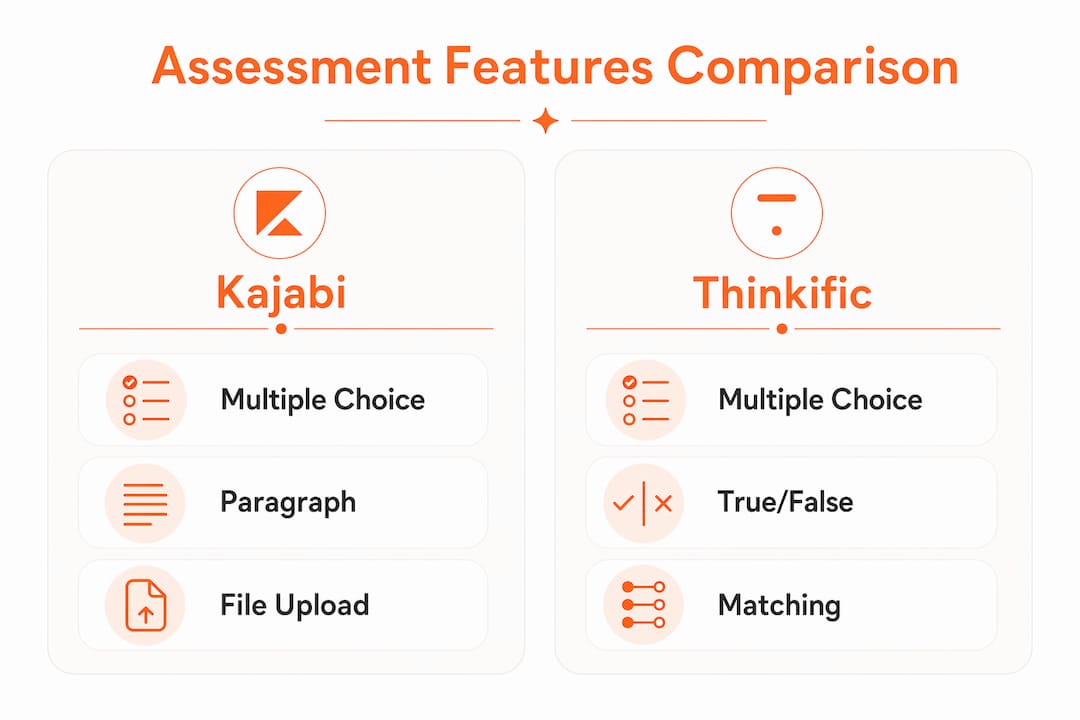
Kajabi excels in ecosystem integration while Thinkific offers more advanced standalone assessment capabilities. For coaches and course creators whose primary goal is engagement and sales automation rather than formal accreditation, Kajabi's approach fits better. The platform is designed as an all-in-one business tool, and its assessment features reflect that priority. Educators should not rely on Kajabi for high-stakes certification programs, but for formative assessments and engagement, it performs well. Formative assessments, meaning low-stakes checks for understanding rather than graded exams, are exactly what most online course creators need.
How can educators use Kajabi assessment data to improve course effectiveness?
Kajabi learning effectiveness improves when you treat assessment results as a feedback loop, not just a grading mechanism. The data you collect tells you where students are confused, which modules lose momentum, and which students are ready for more.
Review assessment results alongside course progress to understand where students may need more support. Look for recurring questions or difficult lessons, then use those patterns to guide your next course update.
Here is how to put that data to work:
- Identify drop-off points. If a large number of students stop completing assessments after module three, that module likely has a clarity or pacing problem. Revise the content before your next cohort.
- Segment students for personalized paths. Tag students who score below a set threshold and enroll them in a supplemental mini-course or invite them to a live Q&A. Tag high scorers and offer them an advanced coaching upsell.
- Refine your content over time. Open-ended paragraph responses are gold. Students will tell you exactly what confused them if you ask the right question. Read those responses and update your lesson scripts accordingly.
- Track completion rates by module. A module with a 90% completion rate followed by one with a 40% rate signals a problem. Use that gap to prioritize your content revisions.
Pro Tip: Export your assessment response data monthly and review open-ended answers as a batch. Patterns in student language reveal the exact objections and confusion points you need to address in your next course update.
Educators should leverage Kajabi's assessment data primarily to guide content improvement and segmentation rather than relying on it for comprehensive learner analytics. That framing keeps your expectations realistic and your actions focused.
What are best practices for integrating Kajabi assessments in course design?
Designing your course with assessments built in from the start produces better outcomes than adding them as an afterthought. These practices will help you get the most from Kajabi's evaluation tools.
- Sequence assessments as separate posts. Videos and assessments cannot coexist under the same lesson post in Kajabi. Structure your curriculum so each video lesson is followed by a separate assessment post. This also makes content locking easier to configure.
- Match assessment difficulty to the lesson. A module introducing a new concept should use a simple two or three question check-in. A module covering a complex skill can support a longer, more detailed assessment. Mismatched difficulty frustrates students and inflates drop-off rates.
- Use content locking strategically, not universally. Lock content after assessments in foundational modules where understanding is cumulative. In later, more advanced modules, you can give students more flexibility. Over-locking a course feels punitive and can reduce motivation.
- Pair every assessment with an automation. A bare assessment with no follow-up is a missed opportunity. Connect each assessment to at least one automated email, whether that is a congratulations message, a resource link, or a next-step prompt. This keeps the experience feeling personal.
- Use quiz lead magnets to feed your course. Quiz lead magnets on Kajabi achieve an average conversion rate of 40.1%, far above the 10 to 20% typical for ebooks or checklists. That means you can use a short quiz on your landing page to qualify leads and then move them directly into your course funnel.
- Plan for certificate delivery via automation. Kajabi's native certificate customization is limited, but custom certificates via automation workflows are fully possible. Set up an automation that sends a branded certificate PDF when a student completes all required assessments.
These practices work together. When your assessments are sequenced correctly, difficulty-matched, and connected to automations, the course runs like clockwork without you manually following up with every student.
Key takeaways
Kajabi assessments are most powerful when treated as part of a connected automation system rather than standalone quizzes, making them a core tool for engagement and personalized learning at scale.
| Point | Details |
|---|---|
| Assessments drive progression | Content locking tied to assessments forces completion and increases student participation. |
| Automation multiplies impact | Connecting assessments to email triggers and tags creates personalized follow-ups without manual effort. |
| Data guides improvement | Use individual completion rates and open-ended responses to refine content between cohorts. |
| Platform has real limits | Kajabi lacks randomization and question banks, making it unsuitable for formal certification programs. |
| Design structure matters | Sequence assessments as separate posts after video lessons to enable content locking workflows. |
Why I think most course creators underuse Kajabi assessments
Here is what I have observed working with coaches and educators on their Kajabi builds: most people add one quiz at the end of a course and call it done. That approach misses almost everything that makes Kajabi's assessment tools worth using.
The real value is not the quiz itself. It is what happens after the quiz. When you connect an assessment result to a Kajabi automation, you are essentially building a decision tree inside your course. A student who struggles gets support. A student who excels gets an offer. That is the kind of personalized experience that used to require a full-time team to deliver. Now it runs automatically.
I also want to be honest about the limits. If you are building a program that leads to a professional credential or accreditation, Kajabi is not the right tool for your assessments. You will need a dedicated LMS with question banks, randomization, and proctoring options. Kajabi is built for coaches and course creators who want engagement and business automation, and it does that exceptionally well. Knowing which category you are in saves you a lot of frustration.
My recommendation: start with the Kajabi ecosystem benefits in mind. Build assessments that feed your automation sequences, segment your students, and generate data you will actually use. Focus on formative checkpoints, not formal exams. That is where Kajabi shines, and that is where your students will feel the difference.
Ready to build a Kajabi course that actually works?
If you are setting up Kajabi assessments and want the automation and course structure to work together from day one, Sierra Lin Design can help. The custom Kajabi web design services are built specifically for coaches and educators who want a course platform that runs efficiently without the tech headaches. From assessment sequencing to automation setup, every detail is handled with your student experience in mind. Not ready for a custom build yet? Grab the free Kajabi templates to get your course structure started quickly and correctly.
FAQ
What is the role of assessments in a Kajabi course?
Kajabi assessments track student progress, enforce content locking, and trigger automated follow-ups based on results. They serve as engagement tools that connect learning checkpoints to personalized marketing and coaching workflows.
How do Kajabi quizzes differ from a dedicated LMS?
Kajabi supports multiple choice, paragraph, and file upload question types but lacks question banks, randomization, and timed testing. Dedicated LMS platforms like Thinkific offer more advanced assessment features for formal or accredited programs.
Can Kajabi assessments trigger automated emails?
Yes. When a student completes or passes an assessment, Kajabi can automatically send an email, apply a tag, or enroll the student in another offer. This makes personalized follow-up possible without manual effort.
Are Kajabi assessments suitable for certification programs?
Kajabi assessments are best suited for formative engagement rather than high-stakes certification. The platform lacks the randomization and question bank features required for formal accreditation programs.
How quickly can youcreate an assessment in Kajabi?
Setting up a Kajabi assessment typically takes less than two minutes inside the course dashboard, including enabling content locking and connecting automation triggers.
Recommended
- Kajabi Coaching: How It Works and Why It's SO GOOD!
- Kajabi for Coaches: How to Use It and Why It's the BEST!
 Sierra Janisse · Founder of Sierra Lin Design
Sierra Janisse is a verified Kajabi Expert who helps online business owners build profitable websites on Kajabi. From SEO and copywriting to website design, branding, automations and funnel strategy, she is the go-to expert for Kajabi users who want to attract more clients and customers with their websites.

🚨Get the FREE Checklist
Skip the Kajabi tears—Swipe the free Website Checklist & Funnel Map
Exactly what should go where on your Kajabi site to maximize leads.