The Role of Kajabi Tags for Subscribers in 2026

Kajabi tags are labels you apply to contacts to categorize, filter, and segment your subscriber list for targeted marketing. Understanding the role of Kajabi tags for subscribers is the foundation of any effective email strategy on the platform. Tags work alongside Kajabi's automation engine to trigger email sequences, assign content access, and group contacts by behavior, interest, or purchase history. Kajabi has also introduced lifecycle stages as first-class audience groupings, which complement tags and reduce the manual work of managing your list. Together, these tools give coaches and course creators a precise way to send the right message to the right person every time.
What is the role of Kajabi tags for subscribers?
Tags are the backbone of Kajabi subscriber management. A tag is a short text label attached to a contact record. It tells Kajabi something meaningful about that person: what they downloaded, what they bought, where they are in your funnel, or how they interact with your emails.
The core function of tagging subscribers in Kajabi is segmentation. Segmentation is most valuable when kept simple and actively used, not when it sits in a complex system nobody touches. Two segments alone, engaged versus unengaged and buyers versus non-buyers, give you a working foundation that most course creators never fully build.

Tags also serve as automation triggers. When a subscriber receives a tag, Kajabi can automatically enroll them in a sequence, grant product access, or send a specific broadcast. This is where tags stop being just labels and start running your marketing like clockwork.
How to create and apply Kajabi tags to subscribers
Creating and applying tags in Kajabi is straightforward once you know where to look. The process follows a clear path through your Contacts area and your automation settings.
-
Go to your Contacts area. Open any contact record and click the Tags field. Type a new tag name and press Enter to create it. Kajabi saves it to your account for future use.
-
Apply tags via form submissions. When you build a lead magnet opt-in form, add an automation that tags every new subscriber with a relevant label, such as "Lead Magnet: Free Guide." This fires automatically the moment someone submits the form.
-
Tag buyers through product automations. Inside any Kajabi product, set up a post-purchase automation that applies a "Buyer: [Product Name]" tag. Every new customer gets tagged without any manual work on your end.
-
Use email broadcasts to tag by behavior. When you send a broadcast, you can attach an automation to any link inside the email. If a subscriber clicks your pricing page link, Kajabi applies a tag automatically based on that click. This tells you exactly who is interested in buying.
-
Filter and send to tagged segments. When creating a broadcast, use the filter options to include or exclude contacts by tag. You send only to the people the message is relevant for.
Pro Tip: Keep a master tag list in a Google Sheet or Notion doc. Kajabi's tag entry field does not always suggest existing tags, which means duplicate tags appear easily. A master list keeps your naming consistent and your data clean.
How do Kajabi tags improve audience segmentation?
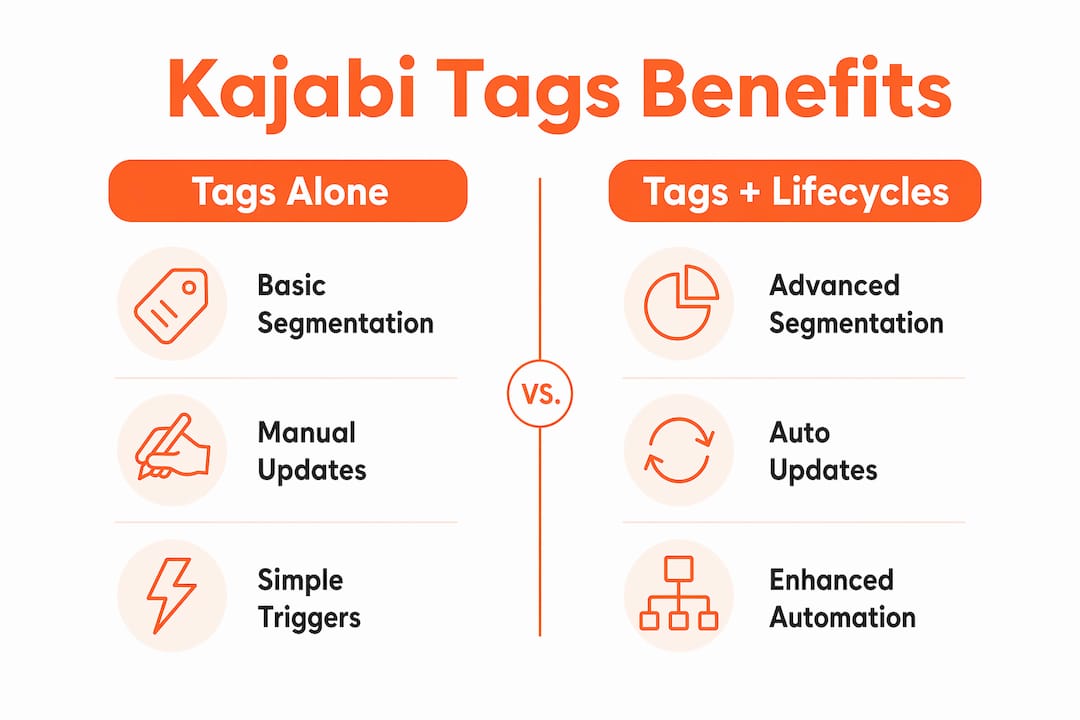
Tags make segmentation concrete. Without them, your entire list receives the same email regardless of where each person is in their relationship with you. That approach wastes your subscribers' attention and yours.
The most effective segments for course creators start with these four groups:
- Engaged subscribers: People who open and click regularly. These contacts are warm and ready for offers.
- Unengaged subscribers: People who have not opened in 60 or more days. These contacts need a re-engagement sequence or removal.
- Buyers: Anyone who has purchased at least one product. They already trust you and convert at higher rates on upsells.
- Non-buyers: Subscribers who have not purchased yet. They need nurture content and social proof before an offer lands.
Sending emails based on subscriber actions increases open rates and click rates while reducing unsubscribes. That combination directly improves revenue. The logic is simple: relevant emails get read, irrelevant ones get ignored or reported.
The table below shows how tag-based segments map to content strategy:
| Segment | Tag Example | Content Strategy |
|---|---|---|
| New lead | Lead Magnet: Checklist | Welcome sequence, free value content |
| Engaged non-buyer | Clicked: Pricing Page | Sales sequence, testimonials, offer emails |
| Buyer | Buyer: Course Name | Onboarding, upsell sequence, community invite |
| Unengaged | Inactive: 90 Days | Re-engagement campaign, then list clean |
Kajabi also lets subscribers opt out of specific email types, such as promotional versus product update emails. This preserves the relationship even when someone is not ready to buy, which protects your list quality over time.
Common challenges and best practices in managing Kajabi tags
Tag management gets messy fast if you do not set rules from the start. The most common problem is tag duplication. Because Kajabi does not always auto-suggest existing tags, you can end up with "buyer course1," "Buyer: Course 1," and "buyer-course-1" all meaning the same thing. That fragmentation breaks your segmentation logic.
Best practices that prevent this from happening:
- Create a naming convention before you tag anyone. Decide on a format, such as "Category: Descriptor," and stick to it. Examples: "Lead: Webinar," "Buyer: Signature Program," "Interest: Pricing."
- Maintain a master tag registry. A simple spreadsheet with every tag name, its purpose, and the automation that applies it saves hours of cleanup later.
- Audit your tags quarterly. Remove tags that no longer apply to any active automation or segment. Dead tags clutter your Contacts area and confuse your data.
- Use lifecycle stages to reduce tag volume. Kajabi's lifecycle stages (lead, buyer, repeat customer, lapsed) automate targeting logic that you would otherwise need multiple tags to replicate.
Pro Tip: Plan your tags and follow-up actions together. For each tag, write down what it means, when it should be applied, and whether it should trigger a message or another action. Review that map before building your automations.
How do lifecycle stages and automations extend Kajabi tags?
Kajabi's lifecycle stages are a newer layer of audience organization that sits above individual tags. Where tags describe specific behaviors or interests, lifecycle stages describe where a subscriber stands in their overall relationship with your business.
The four lifecycle stages Kajabi uses are lead, buyer, repeat customer, and lapsed. These stages update automatically based on purchase activity and engagement patterns. Lifecycle stages reduce manual data analysis while giving you accurate, always-current segments to broadcast to.
The real power comes from combining lifecycle stages with tags. A lifecycle stage tells you someone is a buyer. A tag tells you which product they bought and which webinar they attended before purchasing. Together, they let you send a message that references exactly what that person experienced.
| Approach | Tags alone | Tags plus lifecycle stages |
|---|---|---|
| Segment accuracy | Depends on manual tagging | Automatic updates plus behavioral detail |
| Maintenance burden | High, requires regular audits | Lower, lifecycle logic runs automatically |
| Broadcast targeting | Filter by tag only | Filter by stage, tag, or both |
| Personalization depth | Moderate | High |
Automation workflows triggered by tag application complete this picture. When a subscriber clicks a link and receives the "Interest: Pricing" tag, an automation can immediately enroll them in a three-email sales sequence. Grouping subscribers by journey stage means the right content reaches the right people without you manually checking who clicked what. That is the difference between a list that runs on autopilot and one that demands your attention every week.
Key Takeaways
Tags are the primary tool for subscriber segmentation in Kajabi, and combining them with lifecycle stages and automation produces the most accurate, lowest-maintenance marketing system available on the platform.
| Point | Details |
|---|---|
| Tags define segments | Apply tags via forms, purchases, and email link clicks to categorize every subscriber automatically. |
| Segmentation lifts performance | Sending relevant emails by segment increases open rates, click rates, and revenue while cutting unsubscribes. |
| Duplicate tags break logic | Maintain a master tag list and a consistent naming convention to keep your data clean and reliable. |
| Lifecycle stages reduce work | Kajabi's lead, buyer, repeat customer, and lapsed stages automate targeting logic that tags alone cannot handle. |
| Automation completes the system | Pair every tag with an automation so that tagging a subscriber triggers the next right action immediately. |
What I've learned from building tag systems for coaches
Most coaches I work with come to me with one of two problems. Either they have no tags at all and send every email to their entire list, or they have 80 tags with no logic connecting them. Both situations produce the same result: low engagement and a lot of frustration.
The fix is almost always simpler than people expect. Start with four tags: one for new leads, one for buyers, one for your most engaged non-buyers, and one for inactive contacts. Those four segments cover 90% of the decisions you need to make about who gets which email. You can build from there once the foundation is running.
What I find most interesting is how lifecycle stages have changed the conversation. Before Kajabi introduced them, coaches needed a tag for every stage of the customer journey. Now, lifecycle stages handle the broad strokes automatically, and tags can focus on the specific details that matter for personalization, like which lead magnet someone downloaded or which workshop they attended. That division of labor makes the whole system cleaner.
The mistake I see most often is building a complex tag system before writing a single automation to use it. Tags without automations are just labels. They do not do anything until you connect them to a sequence, a broadcast filter, or a product trigger. Build the automation first, then create the tag that fires it.
If you are just starting out, resist the urge to tag everything. Pick your two most important segments, build one automation for each, and watch what happens to your open rates. The results will tell you exactly where to go next.
How Sierra Lin Design helps business owners build smarter Kajabi systems
Getting your tag strategy right is one part of building a Kajabi site that actually converts. At Sierra Lin Design, the work goes beyond design. Every custom Kajabi website includes thoughtful automation planning so your subscriber management works from day one. If you want a head start, the free Kajabi templates include pre-built structures that support segmentation and email workflows without starting from scratch. For business owners who want a fully custom build, the Sierra Lin Design portfolio shows exactly what a well-built Kajabi site looks like in practice. Good design and good automation belong together, and that is what every Sierra Lin Design project delivers.
FAQ
What are Kajabi tags used for?
Kajabi tags categorize and segment subscribers based on their behavior, interests, and purchase history. They trigger automations and filter broadcast audiences so the right message reaches the right person.
How do I apply tags automatically in Kajabi?
Set up automations on forms, products, or email broadcast links to apply tags without manual work. For example, a subscriber who clicks a pricing link can receive a "Interest: Pricing" tag automatically.
What is the difference between Kajabi tags and lifecycle stages?
Tags capture specific behavioral details like which product someone bought or which link they clicked. Lifecycle stages (lead, buyer, repeat customer, lapsed) update automatically based on overall purchase and engagement activity, giving you a broader view of where each subscriber stands.
How do I avoid duplicate tags in Kajabi?
Kajabi does not always suggest existing tags when you type, so duplicates appear easily. Maintain a master tag list in a spreadsheet and use a consistent naming format like "Category: Descriptor" across all automations.
Do Kajabi tags improve email marketing results?
Yes. Segmented email campaigns produce higher open rates and click rates while reducing unsubscribes compared to sending the same email to your entire list. Tags are the mechanism that makes that segmentation possible in Kajabi.
Recommended
 Sierra Janisse · Founder of Sierra Lin Design
Sierra Janisse is a verified Kajabi Expert who helps online business owners build profitable websites on Kajabi. From SEO and copywriting to website design, branding, automations and funnel strategy, she is the go-to expert for Kajabi users who want to attract more clients and customers with their websites.
🚨Get the FREE Checklist
Skip the Kajabi tears—Swipe the free Website Checklist & Funnel Map
Exactly what should go where on your Kajabi site to maximize leads.