Kajabi Customer Support Quality Explained for Coaches

Kajabi customer support quality is defined by three variables: your plan tier, the type of issue you're facing, and how well you understand the platform before you need help. Growth and Pro plan users get 24/7 live chat access, while Basic plan users are limited to business hours support. The platform relies on its Help Center, live chat, and email ticketing, with no phone support available on any plan. Knowing this structure upfront saves you from a frustrating surprise when you need help most.
Kajabi customer support quality explained by plan and channel
Kajabi's support infrastructure is built around three main channels: the Help Center, live chat, and email ticketing. Each serves a different purpose, and your access depends directly on which plan you're paying for.

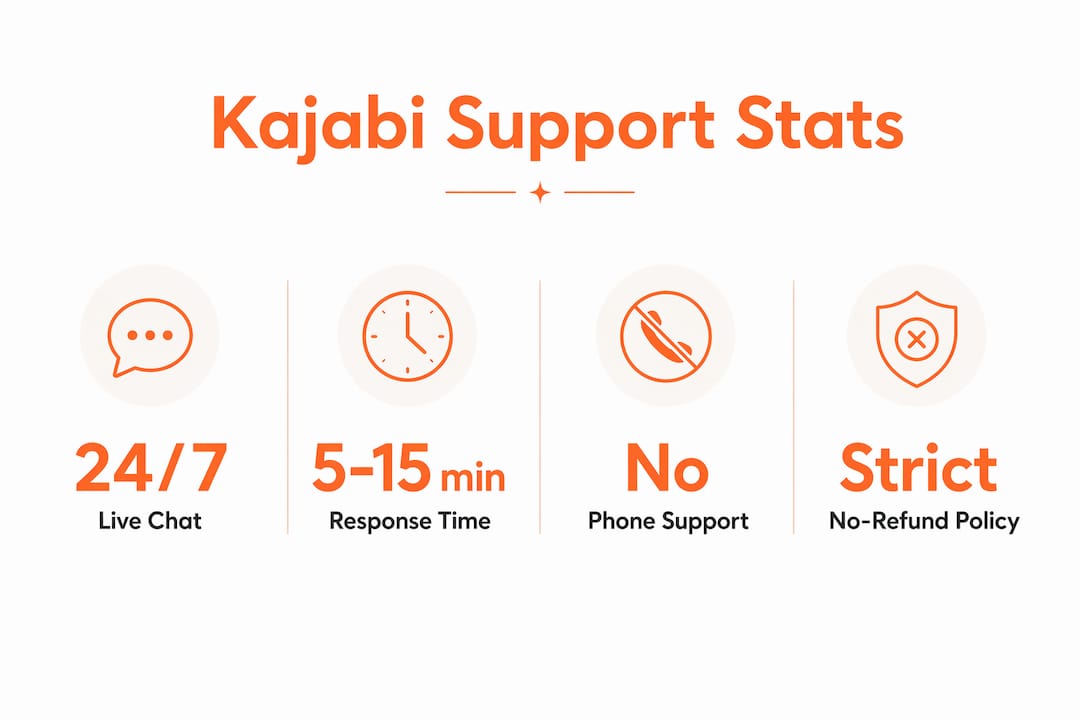
No phone support exists on any Kajabi plan. That's a firm policy, not a gap they're filling. All support runs through digital channels, which works well for straightforward questions but can feel slow when something breaks during a live launch.
Here's how the channels break down by plan:
| Feature | Basic Plan | Growth Plan | Pro Plan |
|---|---|---|---|
| Help Center access | Yes | Yes | Yes |
| Live chat support | Business hours only | 24/7 | 24/7 |
| Email ticketing | Yes | Yes | Yes |
| Weekly live Q&A workshops | Yes | Yes | Yes |
| Phone support | No | No | No |
Live chat response times during US business hours typically land in the 5–15 minute range. Off-hours, especially for Basic plan users, waits can stretch to 30–60 minutes or longer. Escalated issues that move from chat to email resolve in 24–48 hours on average.
Pro Tip: If you're on the Basic plan and you have a time-sensitive issue, submit your email ticket at the start of your business day. You'll get a faster turnaround than waiting for off-hours chat.
The Growth and Pro plans include more admin users and priority support access. If you're running a coaching business at any real scale, the Basic plan's limited support hours can create some hassle.
How do users rate kajabi's support responsiveness?
User feedback on Kajabi support is genuinely split. The pattern that shows up across Trustpilot and Reddit is consistent: coaches who use the platform for standard course delivery and email marketing tend to praise the support team. Those who hit billing issues or technical failures during critical business moments tell a very different story.
The positive side is real. Many users report knowledgeable, professional reps who resolve common platform questions quickly. Live chat agents generally know the product well, and for everyday questions about funnels, pipelines, or product setup, the experience is solid.
The negative side is also real. Common complaints cluster around three areas:
- Billing disputes: Charges after free trials catch users off guard, and support agents enforce the no-refund policy without exception.
- Technical failures during launches: When something breaks during a product launch or live event, resolution times feel too slow for the stakes involved.
- Escalation delays: Issues that move from live chat to email can sit for a full business day before getting a meaningful response.
"Mixed reviews are] evident in Trustpilot and Reddit data" on Kajabi support, with high praise for professionalism sitting alongside frustration over rigid policies and billing disputes, especially during critical business moments.
The honest read here is that Kajabi support excels at general platform guidance and struggles with complex technical and urgent billing issues. That's not unusual for an all-in-one platform at this price point, but it's worth knowing before you commit.
What are the real limitations of kajabi support?
The most important limitation to understand is Kajabi's no-refund policy. Support agents follow strict company guidelines with no flexibility on billing refunds or exceptions. This isn't a case-by-case judgment call. If you miss the end of your trial or forget to cancel before a renewal, the charge stands.
A major user pitfall is unawareness of the 14-day auto-conversion policy after free trials. Many negative reviews trace directly back to this single issue. The trial converts to a paid subscription automatically, and support will not reverse the charge.
Beyond billing, here are the structural limitations you should plan around:
- Live chat is triage, not resolution. Complex issues get handed off to email, which means a second wait cycle begins after your initial chat.
- Email escalations take 24–48 hours. For escalated technical issues, a full business day wait is standard. Plan accordingly if you're near a launch.
- Advanced technical support has limits. Kajabi support handles platform-level questions well. Custom code, third-party integrations, and edge-case scenarios often fall outside what agents can resolve.
- Basic plan users carry more risk. Limited support hours on the Basic plan mean that an off-hours emergency gets no live response until the next business day.
Pro Tip: Before any major launch, test every critical flow: checkout, email delivery, and course access. Don't rely on support to catch problems in real time. Build your own pre-launch checklist and run it 48 hours out.
Understanding these limits isn't discouraging. It's practical. The coaches who get the most from Kajabi are the ones who build their workflows to minimize support dependency in the first place. You can explore how Kajabi scales with your business to understand where the platform's architecture supports you and where you need to plan ahead.
How can you get the most out of kajabi support?
The best Kajabi support experience starts before you ever open a chat window. Completion of official onboarding training correlates directly with fewer support tickets. Most support requests come from knowledge gaps, not platform failures. That's a solvable problem.
Here's what actually works:
- Complete the Getting Started onboarding path. Kajabi's official onboarding covers the core features methodically. Users who finish it report fewer support contacts and faster setup times.
- Use the Help Center first. The Kajabi Help Center contains searchable articles with screenshots and step-by-step guides. Most common questions are answered there in under two minutes.
- Attend weekly live Q&A workshops. These weekly sessions let you ask questions directly and get training on platform features and marketing strategies. They reduce direct support contacts by providing proactive education.
- Monitor your billing dates. Set a calendar reminder three days before your trial ends and before each renewal. This single habit eliminates the most common source of negative Kajabi support experiences.
- Escalate clearly and early. When you do need support, describe your issue with specifics: what you clicked, what happened, what you expected. Vague tickets get slower responses.
Pro Tip: For complex technical questions, skip the back-and-forth and go straight to email with screenshots and a screen recording. Agents resolve detailed tickets faster when they can see exactly what's happening.
The Kajabi support guide at Sierra Lin Design also walks through how to get help efficiently and what to do when standard support isn't enough for your specific setup.
Key takeaways
Kajabi support quality is adequate for everyday platform use but requires realistic expectations around billing policies, escalation timelines, and plan-based access limits.
| Point | Details |
|---|---|
| Plan tier determines access | Growth and Pro plans include 24/7 live chat; Basic plan is limited to business hours. |
| No phone support exists | All Kajabi support runs through Help Center, live chat, and email ticketing only. |
| Billing policy is strict | The no-refund policy is enforced without exception; monitor trial end dates carefully. |
| Escalations take 24–48 hours | Complex issues move from live chat to email, adding a full business day to resolution time. |
| Onboarding reduces support needs | Users who complete official Kajabi training submit fewer support tickets overall. |
What I've learned about kajabi support after working with coaches
Here's my honest take after building dozens of Kajabi sites for coaches: the platform's support is functional, not exceptional. It does the job for standard questions. Where it falls short is exactly where coaches feel the most pressure, which is billing surprises and launch-day technical issues.
The coaches I work with who have the smoothest Kajabi experience share one trait. They treat the platform like a business tool, not a safety net. They learn the onboarding path, they set billing reminders, and they test their client flows before going live. They don't wait for something to break and then call for help.
What I'd tell any coach evaluating Kajabi right now: if you're on the Basic plan and you're running live launches or selling high-ticket offers, the limited support hours can be a risk. The Growth plan's 24/7 live chat is worth the price difference alone when something goes sideways at 10 PM before a launch.
The other thing I'd flag is the gap between what Kajabi support can help with and what actually makes your site work well. Support agents can tell you how to add a product. They can't tell you why your sales page isn't converting, why your branding feels off, or how to set up your client flows so they run without you. That's a different kind of help entirely.
Work with a kajabi expert who knows the platform inside out
Kajabi's support team handles platform mechanics. Sierra Lin Design handles everything that makes your coaching business actually grow. From custom Kajabi web design built around your brand to strategic automation that keeps your client flows running without you, the work goes well beyond what any support ticket can solve. If you're ready to stop piecing things together and want a Kajabi site that works from day one, start by grabbing the free Kajabi templates to see what's possible. Or explore the full range of Kajabi design services to find the right fit for where your business is right now.
FAQ
Does kajabi offer 24/7 customer support?
Kajabi offers 24/7 live chat support only on Growth and Pro plans. Basic plan users are limited to support during US business hours.
How long does kajabi support take to respond?
Live chat responses during business hours typically arrive within 5–15 minutes. Escalated issues handled via email resolve in 24–48 hours.
Does kajabi have phone support?
No. Kajabi does not provide phone support on any plan. All support is delivered through the Help Center, live chat, and email ticketing.
What is kajabi's refund policy?
Kajabi enforces a strict no-refund policy. Support agents apply this policy consistently, with no exceptions for billing disputes or missed trial cancellations.
How can I reduce how often i need kajabi support?
Complete the official Kajabi onboarding training and use the Help Center and weekly live Q&A workshops. Better yet, work with a verified Kajabi Expert you can trust. Users who finish onboarding report significantly fewer support requests.
Recommended
 Sierra Janisse · Kajabi Designer, Kajabi Expert, & Kajabi Website Designer
Sierra Janisse is a verified Kajabi Expert who helps online business owners build profitable websites on Kajabi. From SEO and copywriting to website design, branding, automations and funnel strategy, she is the go-to expert for Kajabi users who want to attract more clients and customers with their websites.

🚨Get the FREE Checklist
Skip the Kajabi tears—Swipe the free Website Checklist & Funnel Map
Exactly what should go where on your Kajabi site to maximize leads.